

2024 has been a big year for Substation Onyx! I’ve had the opportunity to mix, master, or produce a lot of different music projects, both for myself and for other people. Since a majority of my audio processing happens within my DAW, a reliable set of processing plug-ins are critical for keeping my workflow streamlined and my project outputs sounding great.
While most DAWs come with a (sometimes small) set of stock plug-ins, many companies offer plug-ins for application-specific processing or emulation of legendary hardware. However, the cost of these third-party plug-ins can often rival the cost of a DAW itself! Thankfully, there are free offerings from both large companies and small developers that can compete with almost any corresponding paid alternative. In this post I’ve compiled a list of some of my favorite plug-ins that I use regularly while mixing or mastering.
A few quick disclaimers regarding the software listed in this post: These plug-ins are actually used in my studio alongside hardware and paid software because I find them to be just as useful; nothing about this post is sponsored. Furthermore, I’ve taken care to only showcase software that is perpetually free; any plug-ins that I may have obtained for free as a part of a limited-time promotion are excluded. I host these plug-ins in Cockos’ REAPER DAW on a Windows machine, so not every plug-in may be compatible with every setup.
Ozone 11 Equalizer (iZotope)
I frankly have no idea how this is free. Ozone 11 is a paid mastering suite that contains a variety of processors, but iZotope does offer the suite’s EQ for free separately. This EQ almost has everything going for it: a wide variety of bands, shelves, and filter shapes, gain scaling, linear-phase “digital” operation, mid/side processing, unique transient/sustain processing, and an absolutely beautiful spectrum analyzer. One of my favorite (and hidden!) features is the ability to switch on an “analog mode” in the settings, which causes the equalizer to naturally instill some subtle harmonic distortion and bass roll-off in the audio passing through it, similar to many analog hardware equalizers. You could easily get away with using just this EQ for everything.

Ozone 11 is available for most DAWs and operating systems.
ReaComp / ReaXComp (Cockos)
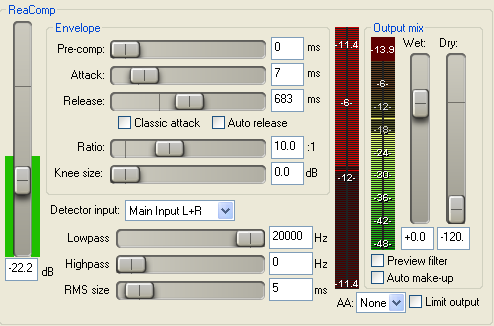
One of the stock plug-ins that comes with the REAPER DAW, the ReaComp compressor is so good that I often times prefer it over paid compressor plug-ins. For certain use cases, it rivals my hardware compressor, the _DIONE bus compressor from WesAudio. ReaComp is a purely digital compressor with such a high degree of configurability that it could be viewed as an engine, rather than a ready-to-use processor. This means that there’s a bit of a learning curve, so knowing ballpark numbers will go a long way in setting up an appropriate envelope and detector input for whatever you intend to compress. Once you get the hang of it though, ReaComp is capable of just about anything except for unlinked stereo (sometimes called dual mono) operation. I hope this is added in a future update, because this is as close as it gets to a one-size-fits-all compressor!
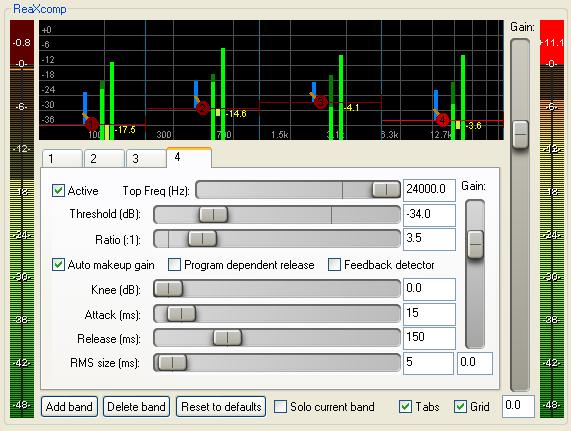
The multi-band compressor in ReaXComp allows you to compress different parts of the frequency spectrum separately with a majority of the same features found in ReaComp. The only mark against ReaXComp is that does not natively allow you to sidechain an auxiliary detector input as you can with ReaComp. I use this plugin primarily for controlling bursts of low-end energy that come off of mic’d speaker cabinets, but I have also used it recently in a mastering scenario to tame swells of energy in the high-end of a track due to the summation of overproduced vocals and bright cymbals.
These plug-ins can be downloaded outside REAPER as a part of the ReaPlugs suite, and are compatible with Windows machines.
Ozone Imager (iZotope)
Another isolated member of the Ozone mastering suite, the Imager is a handy tool that I find myself tacking onto the end of a lot of tracks. When applied to a stereo source, it provides an easy way to control the stereo width of that audio or to just monitor the correlation (handy when mastering or mixing stereo sources with lots of low-end information).
The real magic occurs when applied to a mono source and the “Stereoize” switch is turned on. There are two onboard methods for creating a falsified stereo image from a mono signal, and while I don’t have a hard-and-fast rule for which one to use and when, I will say that I love what Mode II does to lead vocals to make them just a tad bigger.

Ozone Imager is available for most DAWs and operating systems.
Supermassive Delay (Valhalla DSP)
Similar to the Ozone 11 EQ, I have no idea how this is free. Supermassive is a VERY powerful and expansive processor that creates huge delays that repeat indefinitely or scatter into a giant reverb soundscape, depending on the selected mode. This tool’s endless possibilites really lend itself to creative production work. My favorite feature is the ability to clear the current audio buffer to silence the delay trails (necessary if you’ve accidentally set the feedback too high).
While not sonically equivalent, I’d reach for this plug-in for the same reasons I would reach for Eventide’s legendary Blackhole algorithm, but I’ve also used it as a shorter reverb with heavy chorus-style modulation. The only thing you’ll be hard-pressed to get out of it is a basic delay sound. Thankfully, Valhalla covers “normal” in another free delay (see Freq Echo below).

Supermassive Delay is available for most DAWs and operating systems.
Series 2 Plug-In Suite (Tukan Studios)
John Matthews of Tukan Studios has been making freeware for the REAPER DAW for years, and I could easily write an entire article (or small book) detailing each plug-in he’s released. His Series 2 suite contains a wide variety of different tools, most of which are focused on filling in gaps left by the limited stock REAPER plug-ins (e.g. hardware emulations, analog channel strips with matching bus summers, colorful delays/reverbs, etc.). To save time, I’ll only be noting three of my personal favorites, but bear in mind everything in this collection is useful.
The “New Treasure” Distressor emulation gets used a LOT. Folks who know my workflow know I love the Distressor. In the past I’ve loved the Distressor plug-ins from UAD and IK Multimedia, and I find the Tukan emulation to be a less-colorful alternative with the same degree of versatility. I’d be more than content to use this in mix scenarios for drum rooms, bass guitar, clean guitars, etc., but my favorite place to use this is in vocal post-production. I’ll reach for this before the highly-regarded UAD emulation so that any extra coloring can be left for the mixing stage, but I still get the transparent and powerful compression effect that I love from the Distresssor.

I’ve been turned onto the EQP-1A style of EQ recently by a friend. I’ve been using them to sweeten the upper frequencies of gritty or distorted guitars by attenuating a smidgen of 5 kHz and boosting a bit of 10 kHz. I’ve tried a few different EQP-1A EQs, but I reach for the Tukan one before any paid alternative. In addition to the unique EQ curve EQP-1As boast, they also impart a little harmonic distortion on whatever passes through them. Though subtle, I prefer the Tukan distortion.

REAPER’s stock ReaVerberate plug-in leaves a lot to be desired, so if I need a standard studio-grade digital reverb, the Red Lexikan is a vast improvement in almost every way. It produces standard room, hall, and plate reverb sounds in vintage digital fashion (making it an emulation of an emulation of an emulation?). My favorite feature is the ability to control the stereo width of the reverb trails to prevent the reverb from washing out my far stereo information: rhythm guitars, floor toms, and overhead mics.

All Series 2 plug-ins are available for the REAPER DAW from the ReaPack repository. John’s YouTube channel describes these plug-ins in-depth.
bx_boom! (Brainworx)
It’s a simple fact of life that sooner or later someone is going to hand me a kick drum stem where the sub-bass content is lacking or out-of-control. Now, I could grab a dynamic EQ or multiband compressor and go to town shaping the appropriate area of the frequency spectrum… or instead I coud pull up bx_boom!, locate the fundamental sub frequency of the kick, and dial in as much of it as needed. The two-control UI saves me a ton of time when solving this common problem.

bx_boom! is available for most DAWs and operating systems as a part of the PA FREE offerings.
Honorable Mentions
- ReEQ – A REAPER-exclusive parametric EQ with a beautiful UI and workflow comparable to the industry-leading FabFilter Pro-Q EQ plug-in.
- Space Modulator – Yes, I admit I have a bit of a weird thing for flangers, but when the flanger is so versatile that it’s capable of functioning as a stereo doubler or reverb, then I think it’s worth just about anyone’s time! Truth be told, the last time I used this plug-in as a flanger was back in 2021.
- Vocal Doubler – A dead-simple vocal doubler. I’ve used it plenty for the intended purpose, but on occasion I pull it up to duplicate a raw guitar DI signal for stereo rhythm guitars.
- Niveau Filter – If a stem contains a wide frequency range of content but it’s too bass-heavy or too bright, I’ll preprocess the stem through a tilt EQ before proceeeding with archetypical processing. The Niveua Filter is my former go-to tilt EQ for this job.
- Freq Echo – A digital delay with an overpowered pitch-shifting effect. I personally find this delay excels when it’s used for simple delay sounds with minimal pitch shifting.
- Amplex Amplifier Simulation – An alternative instrument amplifier simulator that runs SPICE circuit models. If you have circuit design knowledge, you can build whatever you can dream up in SPICE software such as LTSpice and then run it with Amplex.
- ReaJS – A coding environment for building your own Jesusonic plug-ins. Similar to Amplex, if you can code, then you can write any plug-in you can think of!
To hear these plug-ins in action, you can listen to samples of Substation Onyx’s work in our portfolio!
 Substation Onyx
Leave a comment